


RUN-CHICKEN
4.3116.00 Reviews
App Specs
- Version
- 4.0.7
- Updated On
- License
- Free
- Downloads
- 10,000+
- Developer
- RUN-TIGER LLC
- Categories
- House & Home
- Platform
- Android
Screenshots
 Analysis by AppCompare
Ever found yourself needing a reliable solution to manage your chicken coop without all the fuss? Well, let me introduce you to an app that’s about to make your life a whole lot easier: RUN-CHICKEN. I’ve been trying it out for a bit now, and honestly, it’s like having a personal assistant for my feathered friends. Let’s dive into what makes this app a game-changer.
Getting Started: Simple and Intuitive
When I first downloaded RUN-CHICKEN, I was pleasantly surprised by how straightforward the setup process was. The app interface is clean and user-friendly, which is a big win right off the bat. You don’t need to be a tech genius to navigate through the options.
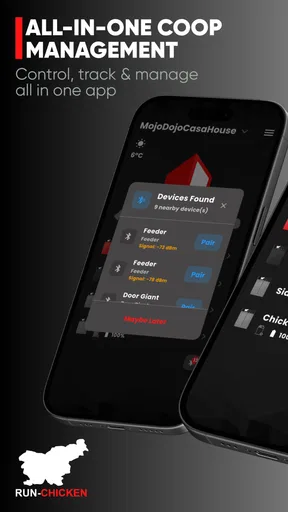
Upon launching the app, you’re greeted with a step-by-step guide that helps you sync the app with your coop door controller. This is crucial because it ensures that everything is set up correctly from the start. The instructions are clear, and within a few taps, I had my coop door connected and ready to go.
Features That Stand Out
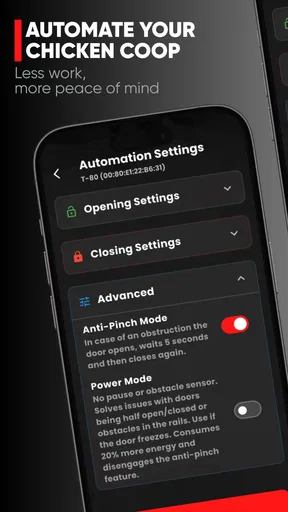
One of the standout features is the automatic door operation. You can schedule when the coop door opens and closes, which is a lifesaver if you’re not a morning person like me. Just set your preferred times, and voilà, your chickens can roam free or be safely tucked away without you lifting a finger.
Another nifty feature is the weather integration. The app takes local weather conditions into account and can adjust the door operation accordingly. For instance, if it’s a gloomy day with potential rain, the app can delay opening the door. This level of customization ensures your chickens are always comfortable and safe.
Monitoring and Notifications
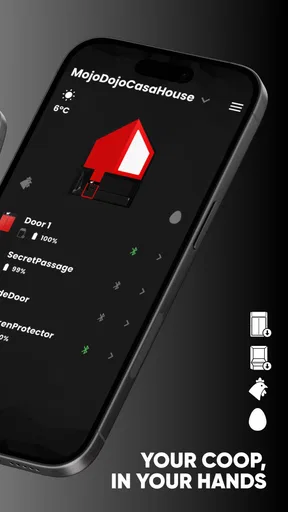
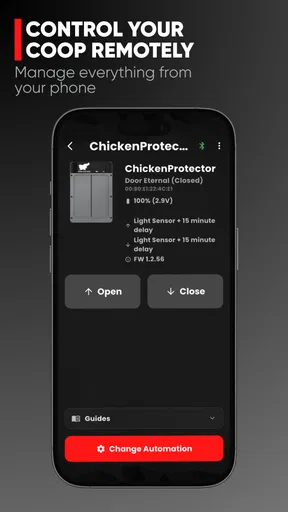
I also appreciate the monitoring tools the app offers. You can keep tabs on the door status and receive real-time notifications. This means if there’s any hiccup or if the door doesn’t close properly, you’ll know immediately. It’s like having eyes on the coop even when you’re miles away.
Notifications are customizable too. You can set alerts for specific events, like the door failing to open or close. Trust me, the peace of mind this provides is invaluable, especially if you’re juggling multiple responsibilities.
Worth Reading Before You Choose

Flipboard Shows What News Apps Must Do Beyond the Feed

Switching to Android Auto Means Rethinking Your Driving Routine

Google Calendar Makes a Crowded Week Easier to Manage

Ludo King Makes the Most of the Minutes Between Plans

Baby Panda World Brings Quick Play to Modern Phones, but Its Game Library Feels Busy

ESPN’s Live Game View Makes Following Close Games Easier
Why You'll Love It
What I love most is how much the app simplifies daily routines. No more worrying about rushing home to shut the coop door or waking up at the crack of dawn to let the chickens out. It takes care of these tasks seamlessly.
Moreover, it’s perfect for those of us who might not be the most tech-savvy. The app’s intuitive design and easy-to-follow instructions make it accessible to everyone. Plus, the added security of knowing my chickens are safe, no matter the time of day, is truly priceless.
A Routine That Still Needs Your Judgment
Automation works best when I treat it as a dependable part of a daily routine, not as a replacement for checking on the flock. I still make a quick visual check of the doorway and the birds when I’m nearby. That habit matters because a phone alert can tell me about a door event, but it cannot assess whether a chicken is lingering near the entrance or whether the coop itself needs attention.
A practical pattern is to review the door status at a convenient point in the day, then respond to an alert only when it calls for action. This avoids turning every notification into a reason to repeatedly open the app. If I’m away, I can use the status check as a useful reassurance; when I’m home, a glance at the coop is often the better confirmation.
Settings Worth Checking Before You Rely on It
I would take time to check the opening and closing schedule against the way the flock actually behaves, rather than choosing times simply because they sound convenient. A schedule that suits a weekday may not suit a day when you leave early or return late. The useful question is whether the routine leaves enough room for your own checks and for the birds to move through the doorway without a rush.
Weather-based adjustments deserve the same kind of attention. They can be helpful when conditions make a normal opening time less suitable, but I would not assume an automated adjustment is a substitute for local judgment. Weather around a coop can feel different from a broad forecast, and the birds’ needs still matter. If the forecast changes, checking the app and the coop together is a sensible way to decide whether the routine remains appropriate.
It is also worth deciding which alerts you genuinely need. Door-operation notices can be useful when you are away, while a stream of notifications that you rarely act on may become easy to ignore. I prefer alerts that would change what I do: a failed opening or closing is more actionable than a routine status that I already expect. That small bit of selectivity helps keep an important warning noticeable.
Faster Patterns for Busy Days
The real time-saving benefit comes from making the app part of a repeatable habit. I would set a normal schedule once, then use status checks and notifications to handle exceptions rather than rebuilding the routine every day. For example, before leaving for an overnight trip, I’d confirm the schedule and door status, make sure the coop is in order, and leave the usual alerts enabled. That is more dependable than relying on memory after packing and heading out.
For a busy morning, the app can remove the need to make a special trip just to open the coop door, but I would still keep feed, water, and a quick look at the flock in my normal care routine. The door is one task, not the whole job. Keeping that distinction clear makes automation genuinely useful without encouraging me to overlook the hands-on parts of looking after chickens.
There is a trade-off when several people help care for the flock: everyone should understand the schedule and what an alert means. A person who sees the door has been handled may assume no further check is needed, while another may be planning to inspect the coop. Agreeing on a simple routine avoids confusion. The app helps coordinate the door, but a shared household habit is what makes the system feel reliable.
Where Automation Has Limits
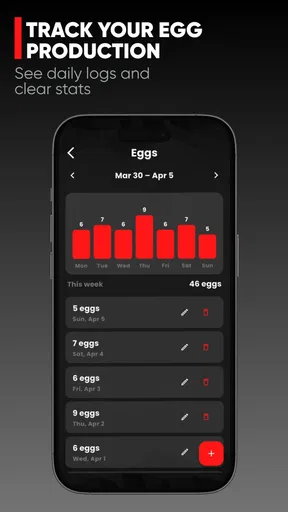
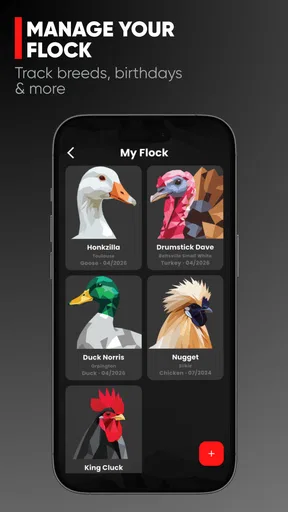
This is a focused tool for a RUN-CHICKEN coop door, so its value depends on already using a compatible door controller. It is not a general poultry-management app that replaces a notebook or a broader system for keeping flock records. If your main need is tracking egg production, feed, health observations, or multiple chores, a dedicated record-keeping method will suit that job better. The app’s narrower role is also its strength: it concentrates on controlling and checking the door.
Compared with manually opening and closing a coop door, the app can make a regular schedule easier to maintain, especially when work or travel makes timing awkward. Compared with a basic timer, its connected controls and door-status awareness can offer more useful oversight. But a manual routine remains preferable for someone who is always home, enjoys checking the coop in person, or does not want a connected controller involved in a basic daily task.
Connectivity and device compatibility are practical considerations, too. Since the app is designed around the RUN-CHICKEN door controller, it makes sense to confirm that the controller you own is the one you intend to manage before building a routine around the app. I would also keep a simple fallback in mind: if the phone or connection is unavailable at a key moment, knowing how you will check the door manually prevents the app from becoming a single point of confidence.
The app is free, and RUN-TIGER LLC is its developer. It is listed in the House & Home category, has an Everyone age rating, and has reached over ten thousand installs. Its average rating is 3.3 from a few hundred ratings, which suggests a mixed reception rather than universal satisfaction. I’d read that as a reason to be realistic: the concept is useful, but how much you benefit will depend on your door setup, connection, and expectations about automation.
Who Will Get the Most from It?
I can see this being especially useful for people with a regular flock routine who sometimes leave home before opening time or cannot reliably get back to close the coop. It also suits owners who want a quick way to check door status while away, without treating remote monitoring as a substitute for proper animal care. If your days vary, the notifications and control can reduce the stress of wondering whether the door was handled.
I would skip it if you do not use a RUN-CHICKEN door controller, if you strongly prefer a fully manual setup, or if what you really want is a complete flock-management record. It may also be more equipment and app involvement than a small, consistently supervised coop needs. In those cases, a manual check or a simple timer may be the more straightforward choice.
Final Thoughts
In the world of poultry management, this app is a breath of fresh air. It combines practicality with useful controls, offering a focused solution for chicken owners. If you’re looking to make the coop-door routine easier and more consistent, it is worth considering.
The current version is 3.2.0, and the app is free to install on devices running Android 7.0 or later. Those details make it easy to judge whether it fits your phone, but the more important decision is whether you want a connected door routine at all. For me, its strongest use is handling predictable opening and closing while keeping a way to check on exceptions.
So, if you’re tired of the daily chicken coop grind, give it a whirl. I promise, once you experience the convenience and reliability, you’ll wonder how you ever managed without it. Your chickens will thank you, and you’ll finally reclaim some precious time for yourself.
Pros
- Simple and intuitive interface.
- Engaging and fun gameplay.
- Regular updates with new levels.
- Minimal ads for free version.
- Quick load times.
Cons
- Limited character customization.
- Requires internet connection.
- No offline mode available.
- In-app purchases can be costly.
- Lacks social sharing features.
FAQs for RUN-CHICKEN
What is RUN-CHICKEN, and how does it work?
RUN-CHICKEN is a fun and engaging mobile game available on both Android and iOS platforms. Players control a quirky chicken on a mission to navigate through various obstacles and collect rewards. The game combines intuitive controls with dynamic graphics to offer a thrilling experience. Ideal for casual gamers, it’s designed to entertain and challenge players of all ages.
Is RUN-CHICKEN free to play, or does it include in-app purchases?
RUN-CHICKEN is free to download and play, offering a range of levels for players to enjoy. However, it does include optional in-app purchases. These can enhance the gameplay experience by unlocking special items or additional features. While not necessary to enjoy the game, they provide an opportunity for players to customize and advance more quickly.
What are the system requirements for RUN-CHICKEN?
To enjoy RUN-CHICKEN seamlessly, Android users need a device running Android 5.0 or higher, while iOS users require iOS 11.0 or later. The game is optimized for both smartphones and tablets, ensuring smooth performance. It’s advisable to have a stable internet connection for downloading updates and accessing certain features within the game.
Does RUN-CHICKEN require an internet connection to play?
RUN-CHICKEN can be played offline, allowing users to enjoy the game without an internet connection. However, some features, such as leaderboards and certain updates, do require connectivity. Playing online also provides access to the latest content and community features, enhancing the overall gaming experience.
How does RUN-CHICKEN ensure user privacy and data security?
RUN-CHICKEN is committed to maintaining user privacy and data security. It adheres to strict privacy policies and utilizes encryption to protect user data. The app requests only essential permissions and offers clear information on data usage. Users can review the privacy policy within the app or on the official website for more details.


